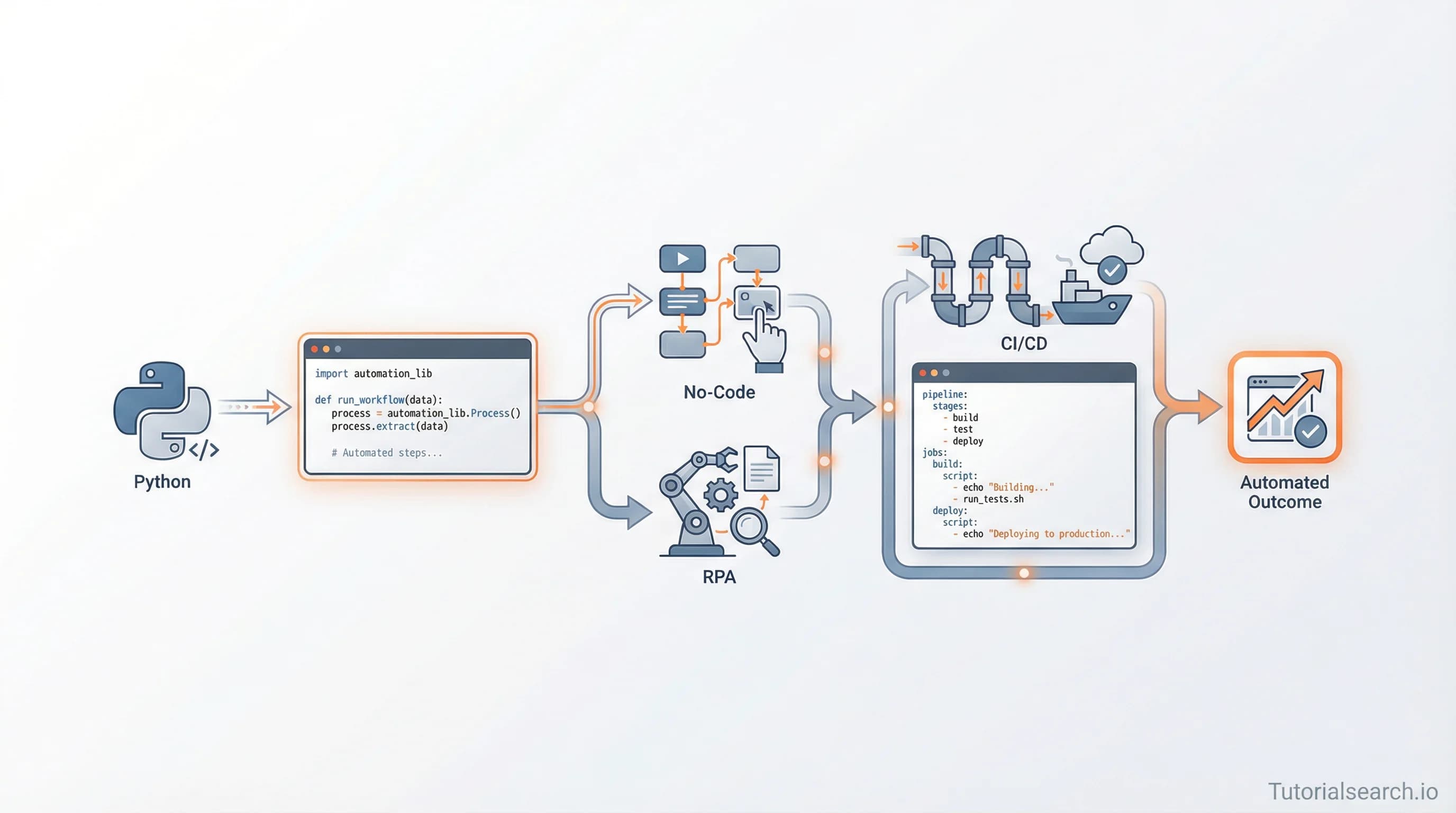
Automation Workflows: Build Faster Than Manual Work
Automation workflows handle repetitive tasks in seconds. Learn no-code platforms, RPA, Python scripting, and CI/CD tools to automate your business processes at scale.
Need a web app built? Hire the team behind TutorialSearch.io
We ship fast, production-grade full-stack apps (Next.js, React, edge infra) — the same stack that powers this site.
Your organization processes thousands of repetitive tasks daily. Data entry clerks manually move information between systems. Managers spend hours generating reports from spreadsheets. Customer service reps handle the same three questions over and over. This waste is invisible until you quantify it.
Automation workflows solve this. They're not the robotic future anymore. They're the practical present. Whether you're building a regulated process in a bank or a content pipeline at a startup, the principles remain constant. Here's something most teams get wrong: choosing the right tool matters less than choosing the right process.
Key Takeaways
- Automation workflows handle repetitive, rule-based tasks faster and more accurately than manual work
- Four platform categories exist: no-code (Zapier, n8n, Power Automate), RPA (UiPath, Blue Prism), code-based (Python, Ansible), and CI/CD (GitHub Actions)
- Start with processes that are painful to measure (high error rates, slow turnaround) rather than those that seem obvious
- Proper workflow design requires mapping current state first, defining clear success metrics, and planning for exceptions
- AI integration is transforming workflows from rigid scripts into adaptive systems that handle edge cases automatically
- The best platform choice depends on complexity, team technical skills, and whether you need unlimited customization
Table of Contents
- Why Automation Workflows Matter Now
- Four Categories of Automation Workflows
- No-Code Platforms: Rapid Deployment Without Code
- RPA Tools: Automating Legacy System Interactions
- Code-Based Automation: Python and Infrastructure Tools
- CI/CD Workflows: Automating Your Development Pipeline
- Building Your First Automation Workflow
- Common Mistakes That Kill Automation Projects
- Measuring Automation Workflow Success
- The AI-Native Automation Future
- FAQ
Why Automation Workflows Matter Now
Five years ago, workflow automation meant hiring developers or buying enterprise software. The cost was prohibitive for most businesses.
Today, automation tools have democratized workflow creation. Your business analyst can build what previously required a three-month development project. But this accessibility creates a new problem: organizations treat automation as a simple checkbox rather than a strategic capability.
The real value comes from automating processes that cost money to run wrong. If your data entry has a 2% error rate and you process 10,000 records monthly, that's 200 errors that generate refunds, customer complaints, or compliance issues. Automation cuts that to near zero. I once worked with a mortgage company that spent $15,000 monthly on staff fixing data entry errors. A three-week automation project eliminated 99% of those errors. The ROI was obvious.
Data from 2026 shows that organizations using workflow automation report 28% average productivity increases and 40% faster process execution times. But these gains only materialize when you build workflows strategically, not randomly.
Four Categories of Automation Workflows
Not all automation is created equal. Your choice of tool depends on what you're automating. The biggest mistake is picking a tool first, then finding processes that fit the tool.
No-code platforms like Zapier and Power Automate let business users build workflows without touching code. You connect apps, set conditions, and define actions through a visual interface. This category has exploded because it's the fastest path from idea to running automation.
RPA (Robotic Process Automation) tools like UiPath and Blue Prism automate interactions with legacy systems that lack APIs. Think of an RPA bot as a digital worker who clicks buttons, fills forms, and reads screens exactly like a human would. This is essential if you're stuck with 30-year-old enterprise software that can't integrate any other way.
Code-based automation uses Python, Ansible, and similar languages. This is the choice for complex logic, custom data transformations, and infrastructure automation. Developers use this when a no-code platform becomes a bottleneck.
CI/CD workflows (like GitHub Actions) automate your software development pipeline. These run tests, build artifacts, and deploy code automatically whenever you push to a repository. Every software team needs this foundation.
Here's the contrarian take: most organizations leap to expensive RPA platforms when simple no-code solutions would work fine. Complexity is the default answer in enterprise software, but start simple. Upgrade only when you genuinely hit limitations.
No-Code Platforms: Rapid Deployment Without Code
No-code platforms are where most organizations should start. They're fast, cost-effective, and require zero programming knowledge. This is where you learn automation workflows without needing a developer's salary on payroll.
Zapier: The Accessibility Champion
Zapier connects over 6,000 apps through a simple trigger-action model. You define a trigger (new email arrives) and actions (create spreadsheet row, send Slack message). Zapier handles all the integration complexity.
The strength of Zapier is ease. A business user can build their first automation in 15 minutes. The weakness is flexibility. Zapier struggles with complex branching logic, loops, and scenarios where workflow steps depend on custom calculations.
Power Automate: Enterprise Integration
Microsoft's Power Automate is the choice for Microsoft-heavy organizations. If your company runs Office 365, Teams, SharePoint, and Azure, Power Automate is deeply integrated with everything you already use.
Power Automate offers 600+ premium connectors and includes AI Builder, which adds intelligent document processing and sentiment analysis. The trade-off is complexity. Setting up non-trivial workflows requires understanding cloud concepts like managed identities and trigger dependencies.
n8n: The Open-Source Alternative
n8n is fundamentally different because you host it yourself. You're not locked into a SaaS platform. n8n includes 350+ nodes and supports JavaScript and Python for custom logic, making it powerful enough for production-grade workflows.
The cost model is attractive: open-source if you self-host, or cloud-hosted at a fraction of Zapier's price. But n8n requires more technical expertise than Zapier. Your team needs to understand nodes, data structures, and error handling.
[Editors' Choice] No-code is the fastest path to ROI. Start with Zapier for rapid prototyping. Move to Power Automate if you're Microsoft-heavy. Upgrade to n8n if you need unlimited customization and don't mind managing infrastructure.
RPA Tools: Automating Legacy System Interactions
You have a 1998 accounting system with no API. It only accepts input through a user interface. You need to extract data from 50 different reports monthly. Hiring someone to do this costs $45,000 annually. RPA is your answer.
Robotic process automation uses software robots to interact with applications the way humans do. The bot reads screen pixels, clicks buttons, types text, and extracts data. It's not elegant, but it's effective.
When RPA Makes Sense
RPA excels at scenarios where:
- Systems lack API integration
- The process is repetitive and rule-based
- Volume is high enough to justify setup costs
- You can't replace the legacy system immediately
RPA is terrible at scenarios where:
- The UI changes frequently
- Human judgment is required
- The process is ad-hoc rather than standardized
Getting Started with RPA
The path to RPA success involves four steps: identify suitable processes, select a platform, design your first automation, and then scale.
Most organizations fail at step one. They pick obvious processes instead of valuable ones. A process might be tedious to watch but generate only minimal errors or savings. Focus on processes with measurable costs: high error rates, slow turnaround, or expensive manual labor.
Popular RPA Platforms
UiPath is the market leader with the most integrations and the steepest learning curve. If you need enterprise support and certifications, UiPath is the default choice.
Blue Prism is stronger for complex decision-making within workflows. Teams prefer it for intricate business logic.
Automation Anywhere sits in the middle on features and pricing.
[Editors' Choice] For RPA beginners, start with UiPath's free community edition to evaluate whether RPA is genuinely needed before committing to enterprise licenses.
Code-Based Automation: Python and Infrastructure Tools
When you need unlimited customization or you're automating infrastructure rather than business processes, code is your tool. This is where teams doing Python applications for automation excel.
Python for Automation
Python dominates because it's readable and has the richest ecosystem of automation libraries.
Selenium handles web browser automation. You write Python code that controls a real browser, filling forms and extracting data from JavaScript-heavy websites. It's slower than APIs but works with any website.
Beautiful Soup parses HTML to extract specific data. If you have web scrapers that need to pull information from static HTML, Beautiful Soup is simpler and faster than Selenium. Both tools appear repeatedly across automation stacks.
[Editors' Choice] The schedule library handles task scheduling in Python. It's lightweight enough that you can run it as a background job managing entire workflows.
Ansible for Infrastructure Automation
Ansible automates configuration management and deployment across hundreds of servers. You write YAML files describing the desired state of your infrastructure, and Ansible makes it reality.
Teams use Ansible for:
- Provisioning new servers with required software
- Updating configurations across deployments
- Running deployment scripts without SSH'ing into each server
- Rolling back bad deployments automatically
The advantage is idempotency. Run the same Ansible playbook twice and it succeeds both times. The first time it makes changes. The second time it sees everything is already configured and does nothing.
Robot Framework
Robot Framework is an open-source test automation tool that works for RPA. It uses a keyword-driven approach, meaning you write test cases in a syntax that almost reads like English.
This makes Robot Framework attractive for non-programmers who need to write complex automation. It's the bridge between no-code platforms and full Python scripting development.
CI/CD Workflows: Automating Your Development Pipeline
Need a web app built? Hire the team behind TutorialSearch.io
We ship fast, production-grade full-stack apps (Next.js, React, edge infra) — the same stack that powers this site.
Every software team needs CI/CD. GitHub Actions is the dominant platform because it's free, built directly into GitHub, and surprisingly powerful.
GitHub Actions runs your tests, builds artifacts, and deploys code whenever you push to a repository. You define workflows in YAML files in a .github/workflows/ directory.
What CI/CD Automates
Testing runs every time you push code. Tests fail → your code doesn't deploy. This catches bugs before production.
Building compiles your code into deployable artifacts. For JavaScript, that means bundling and minifying. For Go, that's creating a binary.
Deployment automatically pushes successful builds to production. This eliminates the manual "I need to run these 10 commands" process that breaks sometimes.
Code quality checks run linters and security scanners. Your code can fail deployment if it violates your style guide or has known vulnerabilities.
CI/CD Best Practices
Start simple. Many teams get paralyzed by perfect CI/CD designs. Run your tests, build, and deploy. Everything else is optimization.
Monitor your pipelines. If tests are slow, developers bypass them. If deployments fail frequently, teams get skeptical. Use dashboards to track pipeline health.
Make failure paths clear. When a test fails, developers should see exactly which test broke and why.
Building Your First Automation Workflow
Choosing a tool is less important than choosing the right process. This is where most teams fail spectacularly.
Step 1: Map Your Current Process
Document exactly what happens today. Use flowcharts. Include decision points. Where do errors occur? Where is the wait time?
Most people skip this step and regret it. You'll discover that the process is more complex than you thought. You'll find steps that nobody remembers why they exist. You'll identify where humans could fail.
Step 2: Identify Success Metrics
Before automation, you can't measure improvement. Define what success looks like.
Bad metrics: "Faster process" (too vague). Good metrics: "Reduce turnaround from 24 hours to 2 hours" or "Eliminate data entry errors in expense reports."
Track the baseline. How long does the process take now? How many errors occur?
Step 3: Choose the Right Tool
Ask yourself:
- Can this process be built in a no-code platform? (Zapier, Power Automate)
- Or does it need low-code flexibility? (n8n)
- Or do we need custom logic? (Python, JavaScript)
- Or is this infrastructure automation? (Ansible)
Most teams should start with no-code unless they're building developer-facing automation.
Step 4: Build a Pilot
Start with 10% of the volume. Automate one department's workflow before rolling out company-wide.
This exposes hidden requirements. Someone will say "But what about quarterly reviews?" or "Sometimes we skip this step when it's urgent." The pilot catches these without affecting your entire operation.
Step 5: Monitor and Iterate
Track your success metrics. Did turnaround improve? Did errors drop?
Automation is rarely perfect on day one. You'll find edge cases. Humans will find exceptions. Your workflows will need tweaks.
Create a feedback channel. Let people report problems with the automation. The best insights come from those doing the work daily.
Common Mistakes That Kill Automation Projects
Automating broken processes. If your current process is chaotic, automation makes it faster chaos. Fix the process first, then automate.
Choosing the wrong tool. Zapier works for 80% of use cases. But some teams build complex workflows in Zapier and hit limits at 90% done. Evaluate tool limits early.
Ignoring the human element. Automation changes how people work. Train them. Explain why the change is happening. Address job loss concerns honestly (automation often means better work, not no work).
Setting unrealistic expectations. Automation isn't instant. You need weeks to plan, build, test, and deploy. Budget accordingly.
Forgetting error handling. The automation works 99% of the time. What about that 1%? Who gets notified? Can someone manually intervene?
Not measuring results. You saved time. How much? $10,000 annually or $200,000? Without numbers, executives won't fund the next automation project.
Measuring Automation Workflow Success
The ROI of automation comes from three sources: time savings, error reduction, and scalability.
Time Savings
Calculate hours saved monthly. Multiply by loaded employee cost ($45 per hour is typical for support staff).
If an automation saves 20 hours monthly and costs $150 monthly, you're breaking even. Everything after that is profit.
Error Reduction
Measure error rates before and after automation. Manual data entry is typically 0.5% error rate. Automation can drop this to 0.01%.
Multiply errors by their cost (refunds, customer service, compliance penalties). If you process 100,000 transactions monthly and each error costs $50, cutting errors from 0.5% to 0.01% saves $24,000 monthly.
Scalability
Automation scales linearly with volume. Hire one person and you increase throughput by one person's capacity. Automate once and you increase throughput infinitely.
If your business grows 50% and the automated process handles it without additional headcount, that's worth quantifying.
Dashboard Metrics
Track weekly:
- Automation success rate (% of runs that complete without manual intervention)
- Average processing time per item
- Error rate
- Cost per transaction
The AI-Native Automation Future
Automation workflows are evolving. Today's workflows are brittle. They follow exact rules. If something unexpected happens, they fail.
Tomorrow's workflows will use AI for decision-making. Instead of "If priority = high THEN forward to manager", workflows will say "Classify this request by urgency using AI, then route to the appropriate person."
Power Automate's AI Builder already supports this. n8n has 70+ nodes for AI integration. Even Zapier is adding AI features.
The practical impact: fewer edge cases. More workflows succeed without human intervention. You spend less time building exception handlers.
But this creates new risks. AI models are imperfect. You need monitoring to catch when AI decisions become unreliable.
Related Topics
Expand your automation knowledge by exploring these related areas:
- Automation Development: Advanced patterns and tools for enterprise automation
- Python Applications: Using Python for real-world automation projects
- Python Basics: Learn the fundamentals needed for automation scripting
- Modern Languages: Compare programming languages for automation tasks
- JavaScript Development: Building automation with Node.js and JavaScript
FAQ
What's the difference between no-code and low-code automation?
No-code platforms like Zapier use only visual builders. You never write code. Low-code platforms like Power Automate and n8n include visual builders but also let you write code when needed. Low-code is more powerful but requires more skill. Choose based on how often you hit tool limitations.
How long does it take to see ROI from automation?
Simple automations (Zapier between two systems) can be built in hours and show ROI in weeks. Complex automations (custom Python scripts, RPA setups) take months and show ROI in 3-6 months. Calculate expected ROI before starting.
Can automation handle exceptions?
Yes, but it requires planning. You design workflows to catch common exceptions and escalate to humans. "If email bounces, notify support" is an exception handler. Workflows with poor exception handling fail when unexpected situations occur.
What's the cost of workflow automation tools?
Zapier charges per task (around $0.01-$1 per completed action). Power Automate costs $4-$15 per user monthly. n8n is free open-source or $15-$50 monthly for cloud hosting. RPA platforms start at $1,000+ monthly. Python and GitHub Actions are free.
Should I hire someone to manage my automation workflows?
Once you have 10+ workflows, consider a dedicated automation engineer. They optimize workflows, catch bugs early, and document processes. ROI comes from preventing failed automations that cost more than their salary.
What happens if my automation platform shuts down?
Zapier and Power Automate are mature enterprises unlikely to shut down. n8n is open-source (self-hosted version survives platform shutdown). GitHub Actions exists as long as GitHub exists. Always choose platforms with exit paths if data loss is a risk.